English
 Arabic
 French
 Spanish
 Portuguese
 Deutsch
 Turkish
 Dutch
Dutch
 Italiano
 Russian
 Romaian
 Portuguese (Brazil)
 Greek
Greek
Capacity Building and Moral Imperative: Creating Stronger Organizations and Communities
Other |
2026-09-28 17:27:08
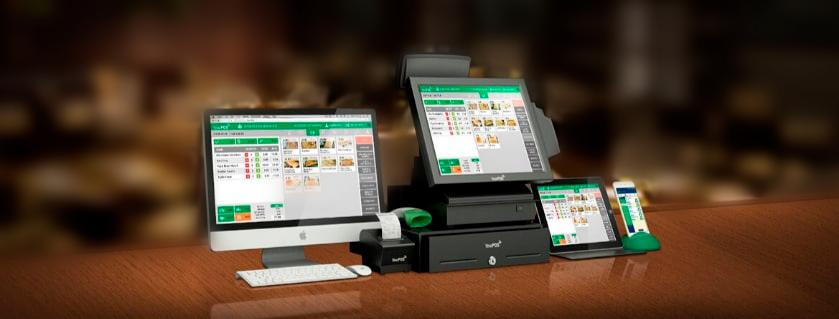
Behind every retail checkout, restaurant order, and service business transaction sits a piece of technology most customers never think about: point of sale (POS) software. It's the system that turns a simple purchase into a recorded, trackable, reportable event and for the business owner, it's often the single most important piece of technology they'll invest in.
At its most basic, POS software processes transactions: it calculates totals, applies discounts, handles tax, and produces a receipt. But that description undersells what modern systems actually do. Today's POS software typically manages inventory in real time, tracks customer purchase history, generates sales reports, integrates with accounting platforms, and in many cases connects to online ordering or e-commerce systems so that in-store and online sales stay synchronized.
This shift from "cash register with extra steps" to full business management hub is arguably the most significant change in the category over the past decade. A café owner using modern POS software isn't just ringing up coffee sales — they're seeing which pastries sell fastest before noon, which staff members process orders quickest during rush hour, and which supplier deliveries need adjusting based on actual consumption patterns.
One of the biggest decisions business owners face is whether to use cloud-based POS software or a traditional, locally installed system. Cloud-based systems store data on remote servers and can typically be accessed from any device with an internet connection, which makes them appealing for owners who want to check sales figures from home or manage multiple locations from a single dashboard.
Traditional, on-premise systems, by contrast, keep data locally and don't depend on an internet connection to function — a meaningful advantage in areas with unreliable connectivity, or for businesses uncomfortable storing sensitive sales data offsite. The tradeoff is generally less flexibility and higher upfront hardware costs, along with the burden of maintaining and updating the system in-house.
Neither approach is universally superior. A single-location retail shop in an area with strong internet infrastructure might benefit enormously from a cloud system's remote reporting and automatic updates, while a high-volume operation in a connectivity-poor area might prioritize the reliability of a local system.
POS software Pakistan helps businesses manage sales, billing, inventory, and reporting more efficiently through one easy-to-use system.
Not all POS software is created equal, and the differences matter more than they might initially appear. Inventory management capability is often the deciding factor for retail businesses — the ability to track stock levels automatically, set reorder alerts, and manage product variants (size, color, style) saves enormous amounts of manual labor. For restaurants and hospitality businesses, table management, split-check functionality, and kitchen display integration tend to matter more.
Payment processing flexibility is another critical consideration. The best POS software supports multiple payment types — cards, contactless, mobile wallets — without forcing merchants into a single payment processor they may not want. Reporting depth also varies significantly between platforms; some offer only basic daily sales totals, while others provide granular breakdowns by product category, staff member, time of day, and customer segment.
Employee management features, including time-clock functionality and permission-based access controls, are increasingly standard as well, particularly for businesses with multiple staff members handling the till.
A POS system rarely operates in isolation. Businesses typically need it to work alongside accounting software, e-commerce platforms, loyalty programs, and sometimes third-party delivery services. Before committing to a platform, it's worth checking which integrations are natively supported versus which would require custom development or a workaround.
Scalability deserves equal attention. A system that works well for a single location with two employees may struggle once a business grows to five locations and fifty staff members. Choosing software with room to grow even if some advanced features aren't needed on day one can save the disruption and cost of switching systems later.
Ultimately, the best POS software is the one that matches the specific shape of a business's operations rather than the one with the longest feature list. A small boutique and a multi-location restaurant chain have almost nothing in common in terms of software needs, even though both technically require "a POS system."
Business owners should approach the decision by mapping out their actual daily operations first, identifying pain points in their current process, and then evaluating software against those specific needs rather than being swayed purely by marketing claims or price alone. A demo, a trial period, and conversations with similar businesses already using the system are the most reliable ways to make a confident choice.
Explore reliable industry resources to discover practical ways to improve business processes, accuracy, and overall performance.